Get a Quote

How to Choose Remote Controlled Animatronics

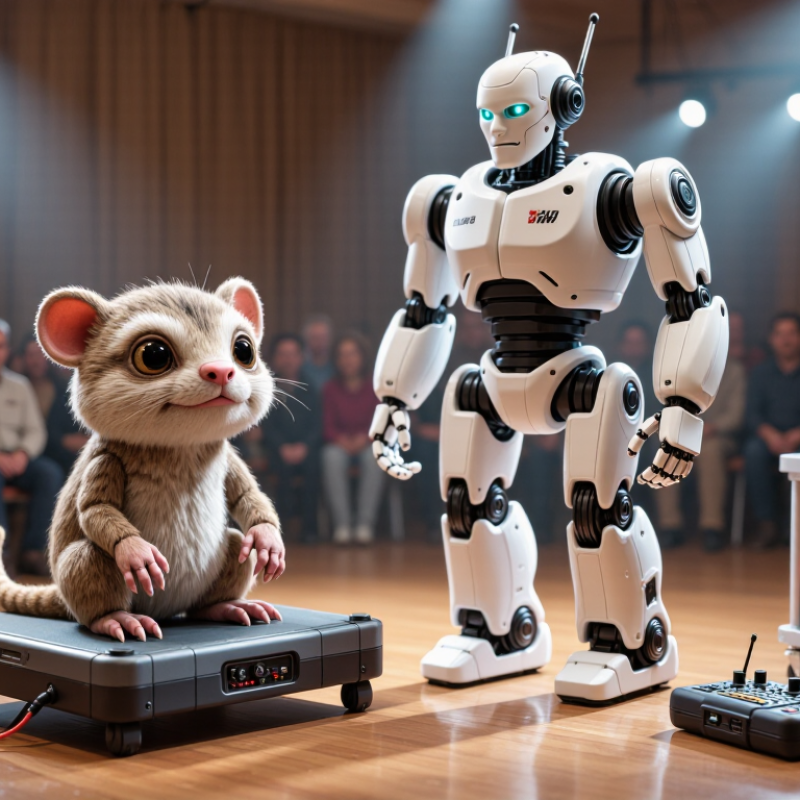
Choosing Remote Controlled Animatronics begins with the scene you need to create. A small tabletop creature has different demands from a full-size figure performing on a busy stage. Consider viewing distance, available space, and how often the character will move. Write these details down before comparing models. Small details matter. A slow head turn may feel convincing up close, while a broad arm gesture may read better across a room. The right choice depends on the audience and setting, not just the number of movements listed.

Control and reliability deserve equal attention. Check the remote’s stated operating range, required batteries, charging method, and available movement functions. Ask whether the unit can repeat actions smoothly and how long it can operate between charges. Request clear specifications and maintenance guidance from the supplier; product descriptions alone may leave practical questions unanswered. If possible, watch a demonstration or ask for an unedited operating video. It can reveal pauses, noisy motors, or movements that look less natural than expected.

Durability matters, too. A prop handled during frequent events may need sturdier materials and accessible service support. Compare the warranty, replacement-part availability, and setup requirements before buying. There may be trade-offs: a lighter model can be easier to transport, but its construction may feel less substantial. That is worth considering. A careful choice balances performance, upkeep, and budget, while leaving room for one honest question: will this animatronic still suit the scene after the novelty wears off?
How to Choose Remote Controlled Animatronics

Identify the Intended Use and Operating Environment

Identify the scene before comparing features. Will the figure entertain guests, support a classroom demonstration, or perform on a moving display? Each use changes the movement, control range, setup time, and supervision needed. A quiet indoor exhibit may need slow, restrained gestures. A busy event floor may require clear sightlines and controls that remain accessible to an operator. Measure doorways, turning space, floor slope, and distance from the controller. Small obstacles can interrupt a performance.

Map the operating environment, too. Dust, moisture, temperature swings, bright light, and nearby people can affect reliability and safe movement. Check the equipment’s specified limits rather than assuming an indoor unit can handle a covered outdoor venue. Noise deserves attention. NIOSH’s Criteria for a Recommended Standard: Occupational Noise Exposure recommends 85 dBA over eight hours, with a 3-dB exchange rate. That guidance concerns worker exposure, not a sound limit for one figure. OSHA’s 29 CFR 1910.95 also sets an 85-dBA action level for workplace exposure. Consider cumulative noise from the whole venue. Test it there. A planning blind spot is choosing from a showroom demonstration alone; real floors are less predictable, and a second site test may reveal issues you missed.

Compare Animatronic Types, Sizes, and Movement Options

Remote-controlled animatronics range from small tabletop creatures to life-size figures. A compact model can fit on a counter and make simple head turns or jaw movements. Larger figures may add moving arms, blinking eyes, or a turning torso. More movement can look convincing, but it also means more parts to maintain. Scale changes the whole setup.

Compare movement options with the space and viewing distance in mind. Head turns, jaw motion, and blinking are often enough for a close display. Across a wide room, broader gestures may be easier to notice. Some systems use a handheld controller; others run programmed sequences. Check how quickly the figure responds and whether cables or battery changes affect placement. Test it at the actual viewing distance.

Choose a type that suits the scene, not just the longest feature list. Measure doorways, ceiling clearance, and the floor area before ordering a large figure. A narrow hallway can make even modest arm movements awkward. For a busy display, simpler controls may be more reliable. I’d still want to see the motion in person when possible; product descriptions can make movement sound smoother than it feels. A short test helps reveal pauses, noise, or gestures that seem too repetitive.

Assess Remote Controls, Range, and Power Requirements

A remote control should feel predictable, not merely impressive on a product sheet. Check whether it uses buttons, a joystick, or a touchscreen, and consider who will operate it. Buttons can be easier with gloves; a joystick may offer smoother movement. Test the controls with the animatronic standing in its intended position. Nearby walls, metal scenery, and other wireless equipment can affect response.

Range claims need context. A clear-room distance may shrink in a crowded venue, especially when people or props block the signal. Test from the actual operator station, then move behind a set wall and check for delayed or missed commands. Keep a comfortable margin beyond the farthest working distance. It is easy to overlook this. If the connection drops, know whether the figure stops safely or continues its last movement.

Power deserves the same practical check. Compare the required voltage and battery type with the unit’s specifications, and ask how long it runs while moving, not just while idle. Motors can drain power faster during repeated turns or lifts. A brief rehearsal helps reveal weak batteries, warm connectors, or uneven movement. I would still leave more charging time than the estimate suggests; schedules rarely go perfectly. For wired setups, check cable reach and route cables where feet and moving parts cannot catch them.

Check Materials, Safety Features, and Maintenance Needs

Choose a remote controlled animatronic as you would a small moving machine, not just a display piece. Inspect the frame for stable joints and the outer materials for durable seams, smooth edges, and a documented flammability rating. “Fire-resistant” alone is not enough; ask which test supports the claim. Check cable insulation, battery access, and whether connectors stay covered during movement. The U.S. Bureau of Labor Statistics recorded 5,283 fatal work injuries in 2023 across all industries. That figure is not specific to animatronics, but it underlines why safe setup and handling deserve attention.

Look for an accessible emergency stop, guarded gears, and clear limits on operating distance. Test the controls in an empty area first. Watch for a pinched cable, a loose panel, or a limb that moves farther than expected. Ask for a maintenance schedule and replacement-part guidance before buying. Daily visual checks and periodic inspection of fasteners, wiring, batteries, and moving joints can catch wear early. NFPA 70E offers recognized guidance for electrical workplace safety, though it does not replace the unit’s own instructions.

Tips: Keep a simple inspection log: date, unusual noise, battery condition, and repairs. A faint clicking sound may seem harmless; it may not be. Follow the maker’s service instructions, and stop operation if movement becomes erratic. No checklist catches everything, so leave room for judgment.

How to Choose Remote Controlled Animatronics

Check Materials, Safety Features, and Maintenance Needs

This guide groups practical questions to review before buying: 3 material checks, 4 safety checks, and 3 maintenance checks. Counts describe this checklist, not product ratings or industry-wide statistics.

Compare Costs and Test Models Before Choosing

Set a budget for the full operating cost, not just the purchase price. Compare the same features across models, including control range, battery life, movement options, and included accessories. Ask for written estimates covering delivery, setup, replacement parts, and routine maintenance. A low sticker price can hide expensive upkeep. That matters. If possible, check how quickly common parts can be replaced and whether basic adjustments need a technician.

Test each model in a space similar to the one where it will be used. Try the controls from several distances, then watch for delayed responses, jerky movement, or sounds that seem too loud in a small room. Run a typical session and note how much battery remains afterward. Check access panels and cables; awkward repairs can cost time as well as money. Keep a simple comparison sheet with test results and total estimates. A brief demonstration is useful, but it is only a snapshot. I would not treat one smooth run as proof of long-term reliability. Ask what the test cannot show, and leave room in the budget for something to go wrong.

How to Choose Remote Controlled Animatronics - Compare Costs and Test Models Before Choosing

Compare common animatronic categories by indicative purchase budget, operating needs, and practical tests. Prices are planning estimates in USD for general-purpose units; customization, shipping, installation, and taxes can change the final cost.

Model Type Indicative Unit Cost Typical Movement Control and Setup Best Fit What to Test Before Buying Ownership Considerations
Compact tabletop figure $200–$1,000 Usually one to three actions, such as head turns, jaw movement, blinking, or a short sound cue. Often controlled by a handheld remote or a simple wired controller. Typically suited to indoor use and a nearby operator. Displays, small attractions, demonstrations, and limited-space exhibits. Run each movement repeatedly; check remote responsiveness, sound level, cable reach, and whether the unit remains stable on its intended surface. Lower space and transport needs. Confirm replacement-part availability and whether the power adapter is included.
Medium interactive figure $1,000–$5,000 Several coordinated movements may include the head, mouth, arms, torso, or eyes; features vary by configuration. May use a handheld transmitter, wired control, or a programmed sequence. Check the stated control method and operating distance with the supplier. Retail displays, visitor centers, themed rooms, and small event installations. Test every control in sequence and at the expected operator position. Listen for unusual noise, observe movement smoothness, and verify that emergency stop or power-off procedures are clear. Allow space for access and maintenance. Ask about duty cycle, service intervals, warranty coverage, and setup requirements.
Large display creature or character $5,000–$20,000+ Can combine multiple head, jaw, limb, or body motions. Larger movement systems may require stronger structure and more installation planning. Control may be wireless or wired, and some units use pre-programmed routines. Confirm line-of-sight needs, power requirements, and whether an operator is required. Permanent attractions, large venues, themed environments, and high-visibility installations. Request a live demonstration under realistic conditions. Test the full motion range, stopping behavior, operating sound, stability, and performance after repeated cycles. Budget for delivery, installation, access to the mechanism, and ongoing service. Check floor loading, clearances, and venue power before ordering.
Custom-built animatronic installation $10,000–$50,000+ Movement, appearance, and control are specified for the project; complexity and number of moving parts affect cost. May include a custom remote, wired control station, or programmed show sequence. Control range and integration should be defined in the project specification. Purpose-built attractions, permanent exhibits, and installations with unusual size or motion requirements. Agree on measurable acceptance tests: movement range, repeatability, control response, noise limits, safe stopping, and a demonstration of the final configuration. Request drawings, a documented maintenance plan, spare-parts terms, training, and written details of warranty and support.

Cost comparison tip: Compare the complete delivered-and-installed cost, not only the unit price. Before committing, test the exact model or a representative production unit, confirm the controls work from the intended operating position, and obtain written details on warranty, maintenance, and replacement parts.

Back to top